Before you start
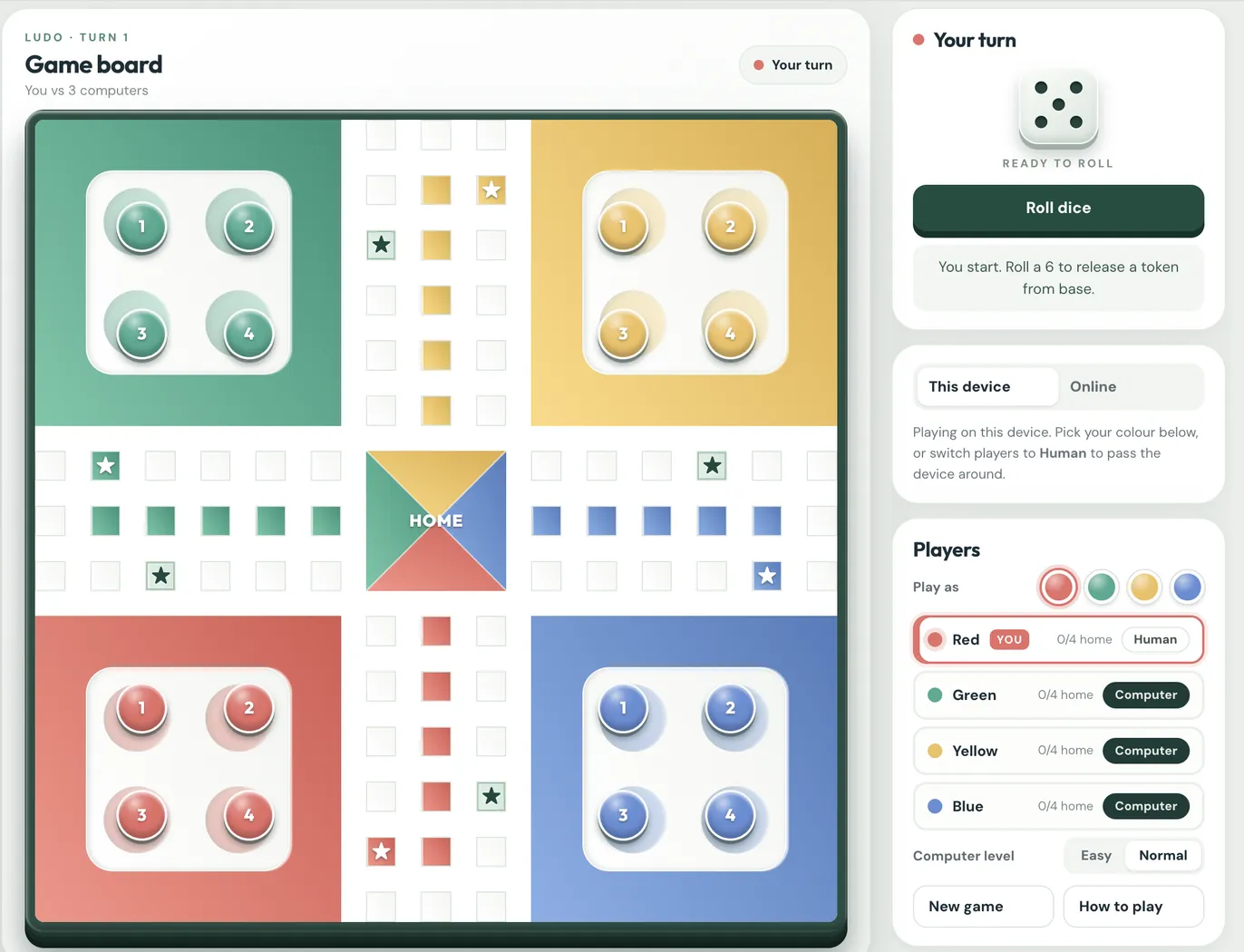
This walkthrough builds a four-player Ludo game in a single HTML file. No frameworks and no build step, just HTML, CSS and plain JavaScript. By the end you’ll have a board that looks good on a laptop and a phone, tokens that hop square by square, the full rules, and computer players you can actually lose to.
If you’d like to see where you’re headed, you can play the finished game at adetoyan.com/ludo. A few rounds there will make the rest of this walkthrough easier to follow.
I’m assuming you’re comfortable with HTML and CSS and have written a bit of JavaScript: functions, arrays, if statements, click handlers. You don’t need any game programming experience. You’ll want a code editor (I use VS Code with the Live Server extension, but opening the file straight in a browser works too) and the browser’s dev tools open, because we’ll lean on the console a lot.
Every part adds to the same index.html, so go in order. I’ve shown the code that matters in each part rather than every line, and I’ll say when something’s left for you to fill in. Most parts end with what you should see on screen before moving on. If you don’t see it, sort that out first. Bugs in a board game pile up quickly.
One thing worth knowing up front: the game is split into three pieces that don’t reach into each other. There’s the data (a few arrays and numbers saying where everything is), the rules (functions that read the data and decide what happens), and the drawing (one render() function that turns the data into what’s on screen). It feels like extra ceremony at first. It’s also why adding computer players later took an afternoon instead of a rewrite.
1. The page skeleton
The layout is two columns: the board on the left and a stack of cards on the right for the players, the dice and the rules. We’ll write the HTML for that now and leave the board empty, since JavaScript will build it in part 3.
<!doctype html>
<html lang="en">
<head>
  <meta charset="utf-8">
  <meta name="viewport" content="width=device-width,initial-scale=1">
  <title>Classic Modern Ludo</title>
  <link rel="stylesheet" href="https://fonts.googleapis.com/css2?family=DM+Sans:wght@400;700&family=Outfit:wght@700;900&display=swap">
  <style>/* Step 2 */</style>
</head>
<body>
  <main>
    <section class="panel boardpanel">
      <h1>Game board</h1>
      <div class="board" id="board">
        <div class="stage" id="stage">
          <div class="grid" id="grid"></div>
          <div class="tokens" id="tokens"></div>
        </div>
      </div>
    </section>

    <aside class="sidebar">
      <section class="panel card">
        <h2>Players</h2>
        <div id="players"></div>
      </section>
      <section class="panel card">
        <h2 id="turntitle">Red's turn</h2>
        <div class="dice" id="dice" role="img" aria-label="Dice"></div>
        <button class="primary" id="roll">Roll dice</button>
        <div class="message" id="message" aria-live="polite"></div>
      </section>
    </aside>
  </main>
  <script>/* Steps 3–9 */</script>
</body>
</html>
The board has two layers on purpose. The squares go in #grid, and the pieces go in #tokens on top of it. If the pieces lived inside the squares, you couldn’t slide them from one square to the next, which is most of what makes the game feel nice later. Both layers sit inside #stage so that in part 9 we can rotate the whole board and give each player their own colour at the bottom.
The aria-live="polite" on the message box means screen readers will read out each new message (“Green rolled 4”) as it appears. It costs nothing, so it’s worth adding now.
One gotcha with fonts: load them with a <link> tag like above. You’ll see tutorials put an @import in the CSS instead, and that’s fine as long as it’s the very first line of the stylesheet. Put it anywhere else and the browser quietly ignores it. My first version of this game did exactly that, and I spent a while wondering why the fonts looked wrong.
Open the page and you should see two headings and a plain Roll dice button. It looks terrible. That’s expected.
2. Colours, layout and the board frame
I like to put every colour in a CSS variable before writing anything else. If you decide the red is too orange halfway through, you change one line instead of hunting through the file.
:root{
  --red:#e76d67; --green:#42aa91; --yellow:#efc05e; --blue:#638ed6;
  /* a lighter and darker shade of each, for gradients */
  --red-hi:#fa9287; --red-lo:#d85a52; --green-hi:#6ac8a8; --green-lo:#2c9279;
  --yellow-hi:#ffda80; --yellow-lo:#dfad46; --blue-hi:#85afe9; --blue-lo:#4e7cbd;
  --ink:#192d37; --rim:#274e42;
  --ease:cubic-bezier(.2,.8,.2,1);
  font-family:'DM Sans',system-ui,sans-serif; color:var(--ink);
}
*{box-sizing:border-box}
body{margin:0;background:#e9eee9}

main{max-width:1180px;margin:auto;padding:20px;
  display:grid;grid-template-columns:minmax(0,750px) 320px;gap:22px}
.panel{background:#fff;border:1px solid #e2e9e3;border-radius:24px;
  box-shadow:0 12px 50px #163b2c0d}
.boardpanel{padding:22px}
.card{padding:22px}
.sidebar{display:flex;flex-direction:column;gap:15px}

@media (max-width:850px){ main{grid-template-columns:1fr} }
A couple of things in there aren’t obvious. The board column is minmax(0,750px) rather than just 750px because grid columns refuse to shrink smaller than their content by default, and on a narrow screen that pushes the sidebar off the edge. The 0 lets it shrink. And box-sizing:border-box everywhere means a width includes the padding and border, which saves a lot of arithmetic when you’re sizing a square board.
Below 850px the sidebar just drops under the board. That one breakpoint covers most phones and tablets well enough.
Now the board’s frame. The rim is just a thick dark border, and the stack of box-shadows underneath, each a few pixels lower and a bit darker, is what makes it look like a solid slab sitting on the page:
.board{position:relative;aspect-ratio:1;width:100%;
  border:9px solid var(--rim);border-radius:17px;background:var(--rim);
  box-shadow:0 4px 0 #1b382f,0 9px 0 #102b25,0 14px 0 #0b201c,0 22px 22px #102c2652}
.stage,.grid,.tokens{position:absolute;inset:0}
.grid{display:grid;grid-template-columns:repeat(15,1fr);grid-template-rows:repeat(15,1fr);
  border-radius:8px;overflow:hidden;background:#fff}
.tokens{pointer-events:none}
aspect-ratio:1 keeps the board square whatever its width. The grid gets its own smaller radius (17px minus the 9px border leaves 8px) and overflow:hidden. Skip that, and the corner squares stick out over the rounded rim; it’s a small thing, but once you notice it you can’t stop noticing it.
pointer-events:none on the token layer lets clicks pass through the empty space to whatever is underneath. The tokens will turn clicks back on for themselves.
Refresh, and you should have a dark green rounded square on the left with white cards beside it. Make the window narrow and the cards should drop below the board.
3. Drawing the board with CSS Grid
If you look at a Ludo board long enough, it’s a 15 × 15 grid. There’s a 6 × 6 yard in each corner, a cross of paths three squares wide, and a 3 × 3 home square in the middle. Rather than typing out 225 <div>s, we’ll let JavaScript generate them.
It helps to give every square an address, [row, col], running from [0,0] at the top left to [14,14] at the bottom right. CSS Grid counts its lines from 1, not 0, so the square at [r, c] gets grid-area: r+1 / c+1. You’ll write that +1 a lot.
The yards don’t need to be 36 separate squares each. A grid item can span several cells, so each yard is one element covering 6 × 6:
const keys = ['red','green','yellow','blue'];
const yardOrigin = [[0,0],[0,9],[9,9],[9,0]];   // top-left square of each yard

yardOrigin.forEach(([r0, c0], p) => {
  const yard = document.createElement('div');
  yard.className = 'yard ' + keys[p];
  yard.style.gridArea = `${r0+1} / ${c0+1} / span 6 / span 6`;
  yard.innerHTML = '<div class="yard-inner"></div>';
  grid.append(yard);
});
Same idea for the middle: one element covering 3 × 3, with a small SVG stretched over it for the four coloured triangles. Setting viewBox="0 0 3 3" means one unit in the SVG is one square on the board, which makes the coordinates easy to reason about:
<svg viewBox="0 0 3 3" preserveAspectRatio="none">
  <polygon points="0,0 1.5,1.5 0,3" fill="var(--red)"/>     <!-- left -->
  <polygon points="0,0 3,0 1.5,1.5" fill="var(--green)"/>   <!-- top -->
  <polygon points="3,0 3,3 1.5,1.5" fill="var(--yellow)"/>  <!-- right -->
  <polygon points="0,3 1.5,1.5 3,3" fill="var(--blue)"/>    <!-- bottom -->
</svg>
Each triangle points in from the side its colour’s home lane comes from. I first tried colouring the middle square by square, and three of the four edges came out red because of a fallback I’d forgotten about. The SVG is less code and much harder to get wrong.
For the paths, loop over every address and skip the ones inside a yard or the middle. Whatever’s left is the cross:
for (let r = 0; r < 15; r++) for (let c = 0; c < 15; c++) {
  const inYard   = (r < 6 || r > 8) && (c < 6 || c > 8);
  const inCenter = r >= 6 && r <= 8 && c >= 6 && c <= 8;
  if (inYard || inCenter) continue;
  const cell = document.createElement('div');
  cell.className = 'cell';
  cell.style.gridArea = `${r+1} / ${c+1}`;
  grid.append(cell);
}
The coloured squares (each colour’s home lane, its starting square, and the stars) come from data we haven’t written yet, so you’ll come back to this loop at the end of part 4 to add lane red, start and safe classes. The CSS can go in now. Each colour class sets two variables, and every coloured thing uses those:
.red{--hi:var(--red-hi);--lo:var(--red-lo)}   /* repeat for green, yellow, blue */
.cell{border:1px solid #dbe4df;background:linear-gradient(145deg,#fff,#f4f6f3)}
.cell.lane,.cell.start,.yard{background:linear-gradient(145deg,var(--hi),var(--lo))}
.cell.safe:after{content:'★';color:#17493e}
.yard{position:relative}
.yard-inner{position:absolute;inset:16.667%;border-radius:13%;background:#fff;
  box-shadow:inset 0 2px 5px #183a2e26}
That odd-looking inset:16.667% is one sixth of the yard on each side, so exactly one square’s width of colour shows around the white panel. It lines the yard up with the rest of the board.
You should now have four coloured corners, a white cross, and the four triangles in the middle. It already looks like Ludo, minus the colours on the paths and minus any pieces.
4. Describing the game as data
If you only read one part of this walkthrough carefully, make it this one. The trick is to stop thinking about where a piece is on the board and instead track how far it has travelled. Each token gets a single number. Working out which square that number lands on is a separate, small problem.
First, the route. Write down the 52 squares of the outer loop in order, clockwise, starting from Red’s starting square:
const track = [[6,1],[6,2],[6,3],[6,4],[6,5],[5,6],[4,6],[3,6],[2,6],[1,6],[0,6],[0,7],
  [0,8],[1,8],[2,8],[3,8],[4,8],[5,8],[6,9],[6,10],[6,11],[6,12],[6,13],[6,14],[7,14],
  [8,14],[8,13],[8,12],[8,11],[8,10],[8,9],[9,8],[10,8],[11,8],[12,8],[13,8],[14,8],
  [14,7],[14,6],[13,6],[12,6],[11,6],[10,6],[9,6],[8,5],[8,4],[8,3],[8,2],[8,1],[8,0],
  [7,0],[6,0]];
const starts = [0, 13, 26, 39];          // index where each colour enters the loop
const safe   = new Set([0,8,13,21,26,34,39,47]);   // starts + stars
const lanes  = [ [[7,1],[7,2],[7,3],[7,4],[7,5]],        // red: left arm, inwards
                 [[1,7],[2,7],[3,7],[4,7],[5,7]],        // green: top arm, downwards
                 [[7,13],[7,12],[7,11],[7,10],[7,9]],    // yellow
                 [[13,7],[12,7],[11,7],[10,7],[9,7]] ];  // blue
Typing that track out is tedious, and I’d suggest drawing the board on paper with row and column numbers while you do it. All four colours share the same loop; they just join it at different points, 13 squares apart, which is where [0, 13, 26, 39] comes from.
Now the number for each token:
| Value | Meaning |
|---|---|
| -1 | In base, waiting for a 6 |
| 0 – 50 | On the main loop, this many squares from its own start |
| 51 – 55 | In its own coloured home lane |
| 56 | Home: finished |
And that’s honestly the whole game state:
let tokens = [[-1,-1,-1,-1], [-1,-1,-1,-1], [-1,-1,-1,-1], [-1,-1,-1,-1]];
let turn = 0;          // whose turn: 0 Red, 1 Green, 2 Yellow, 3 Blue
let phase = 'roll';    // 'roll' | 'choose' | 'moving' | 'done'
let roll = 0, sixes = 0, winner = null;
To turn a token’s number into a square, add that colour’s starting offset and wrap around with % 52. Home (56) gets its own position in part 5.
function squareFor(player, progress) {
  if (progress >= 51) return lanes[player][progress - 51];     // home lane
  return track[(starts[player] + progress) % 52];              // main loop
}
Be careful with the count here, because it’s easy to be off by one and the result looks almost right. A token goes 51 squares round the loop (0 to 50), and square 50 is the one right in front of its home lane. My first version let tokens go to 51. They’d go one square past the lane entrance and then jump diagonally back into it, and it took me an embarrassingly long time to spot. There’s a quick console check for this in part 10.
Why go to this trouble? Because almost every rule becomes simple arithmetic. “Can this token move 4?” is progress + 4 <= 56. Red, Green, Yellow and Blue all follow the same rules, and only squareFor needs to know which way each colour goes. And two tokens collide when (starts[a] + progressA) % 52 equals (starts[b] + progressB) % 52, which is all a capture check needs.
With this data in place, go back to the square-building loop from part 3 and add the lane, start and safe classes. The coloured lanes, starting squares and stars should appear.
5. Putting the pieces on the board
The tokens live on the #tokens layer, positioned with percentages. Since the board is 15 squares across, the middle of square [r, c] sits at top: (r + 0.5) / 15 × 100% and left: (c + 0.5) / 15 × 100%. That works at any board size, and there’s a bonus: when you change top and left, a CSS transition will animate the token sliding across.
Make the 16 tokens once, as buttons (so they’re clickable and work with the keyboard), and hang on to them:
const colors = ['#e76d67','#42aa91','#efc05e','#638ed6'];
const tokenEls = [];
for (let p = 0; p < 4; p++) {
  tokenEls.push([]);
  for (let i = 0; i < 4; i++) {
    const b = document.createElement('button');
    b.className = 'token';
    b.textContent = i + 1;
    b.style.setProperty('--color', colors[p]);
    b.addEventListener('click', () => onTokenClick(p, i));
    layer.append(b);
    tokenEls[p].push(b);
  }
}
I’d really stress the “once” there. It’s tempting to wipe the layer and rebuild all 16 buttons on every render, and it even seems to work. But a freshly created element has no previous position, so nothing animates and the tokens teleport. You also lose keyboard focus every time anything moves.
Next, a function that says where a token should be. I’m using board units here, where [7.5, 7.5] is the exact centre of the board:
const holeOffsets   = [[2,2],[2,4],[4,2],[4,4]];   // inside a 6x6 yard
const homeCentroid  = [[7.5,6.5],[6.5,7.5],[7.5,8.5],[8.5,7.5]];  // middle of each triangle

function position(p, progress, i) {
  if (progress === -1) {                         // in base: its own hole in the yard
    const [r0, c0] = yardOrigin[p], [r, c] = holeOffsets[i];
    return [r0 + r, c0 + c];
  }
  if (progress === 56) return homeCentroid[p];   // finished: sits in its own triangle
  const [r, c] = squareFor(p, progress);
  return [r + 0.5, c + 0.5];                     // centre of the square
}
The token itself is a circle with a radial gradient for the shine and a couple of shadows. translate: -50% -50% centres it on its point rather than hanging off it from the top-left corner:
.token{position:absolute;pointer-events:auto;width:var(--size,4.9%);aspect-ratio:1;
  translate:-50% -50%;border-radius:50%;border:2px solid #fff;padding:0;
  color:#fff;font-weight:800;
  background:radial-gradient(circle at 34% 23%,#ffffffa3,transparent 40%),var(--color);
  box-shadow:inset 0 -5px 5px #00000038,0 3px 0 #16302a66,0 5px 6px #102a2966;
  transition:left .17s var(--ease),top .17s var(--ease)}
There’s one more situation to handle. Several tokens can end up on the same square (the star squares especially), and you don’t want them hiding behind each other. So group tokens by position first, and if more than one shares a spot, shrink them and nudge them into a little 2 × 2 cluster:
function renderTokens() {
  const groups = new Map();
  tokens.forEach((arr, p) => arr.forEach((s, i) => {
    const pos = position(p, s, i), key = pos.join(',');
    if (!groups.has(key)) groups.set(key, []);
    groups.get(key).push({ p, i, pos });
  }));
  groups.forEach(list => list.forEach(({ p, i, pos }, j) => {
    const crowded = list.length > 1;
    const dx = crowded ? (j % 2 ? 0.22 : -0.22) : 0;
    const dy = crowded ? (j < 2 ? -0.22 : 0.22) : 0;
    const el = tokenEls[p][i];
    el.style.top  = (pos[0] + dy) / 15 * 100 + '%';
    el.style.left = (pos[1] + dx) / 15 * 100 + '%';
    el.style.setProperty('--size', (crowded ? 0.52 : 0.74) / 15 * 100 + '%');
  }));
}
I also draw a faint circle in each base spot, positioned the same way. When a token leaves, its empty spot makes it obvious.
All 16 tokens should now be sitting in their yards. Try this in the console to see the positioning work: set tokens[0][0] = 10 and call renderTokens(), and Red’s first token glides out onto the board. Then tokens[1][0] = 56 should drop a green token into the green triangle.
6. Rolling the dice and taking turns
Now the rules. A turn goes through a few stages: you roll, you pick a token, it moves, and then either you go again or it’s the next player’s turn. Here’s the whole thing as a picture, which I found useful to have open while writing the code:
Every path ends in one of three places: the same player rolls again, the next colour rolls, or someone has won. This part covers the top row of that diagram, and part 7 covers the rest.
Start with the question the game asks most: which of this player’s tokens can move? A token can move if it isn’t already home, and either it’s in base and you rolled a 6, or it’s out on the board and the roll doesn’t carry it past home.
const HOME = 56;
function legalMoves(p, n) {
  return tokens[p]
    .map((s, i) => ({ s, i }))
    .filter(({ s }) => s !== HOME && ((s === -1 && n === 6) || (s >= 0 && s + n <= HOME)))
    .map(({ i }) => i);
}
That s + n <= HOME is the exact-roll rule. A token three squares from home can’t use a 5; it has to wait for a 1, 2 or 3.
Rolling is next. Pick a number, keep count of sixes in a row, and then work out what happens:
function doRoll() {
  if (phase !== 'roll' || winner !== null) return;
  roll = 1 + Math.floor(Math.random() * 6);
  sixes = roll === 6 ? sixes + 1 : 0;

  if (sixes === 3) return nextTurn('Third six in a row: that roll is forfeited.');

  const valid = legalMoves(turn, roll);
  if (!valid.length) {
    if (roll === 6) { phase = 'roll'; return say('No move, but a 6: roll again.'); }
    return nextTurn(`Rolled ${roll}: no legal move.`);
  }
  phase = 'choose';
  say(`You rolled ${roll}. Pick a highlighted token.`);
  render();
}

function nextTurn(msg) {
  turn = (turn + 1) % 4;
  sixes = 0;
  phase = 'roll';
  say(msg + ` ${names[turn]} is next.`);
  render();
}
You’ll need two small helpers for that: const names = ['Red','Green','Yellow','Blue']; and const say = text => { message.textContent = text; };.
In case the dice line looks like magic: Math.random() gives a decimal between 0 and just under 1. Multiply by 6 and round down and you get 0 to 5, so adding 1 gives 1 to 6, each equally likely.
Notice that doRoll starts by checking phase. Every action in the game should do the same. Without it, someone double-clicking the Roll button gets two rolls, or clicks a token while another one is still moving, and the game ends up in a state that shouldn’t be possible. A lot of “weird bugs” in browser games turn out to be exactly this.
For the dice itself, I’d skip the Unicode dice characters (⚀ to ⚅). They look different on every phone and in every font, and on some they barely show up. A 3 × 3 grid of dots in CSS looks the same everywhere, and you just switch on the right dots for each number:
const pipsFor = {1:[4], 2:[0,8], 3:[0,4,8], 4:[0,2,6,8], 5:[0,2,4,6,8], 6:[0,2,3,5,6,8]};
function setDice(v) {
  dice.innerHTML = [...Array(9)].map((_, k) =>
    `<span class="pip${pipsFor[v].includes(k) ? ' on' : ''}"></span>`).join('');
  dice.setAttribute('aria-label', 'Dice shows ' + v);
}
Last thing for this part: make it obvious what the player can click. In renderTokens, while the phase is choose, give the tokens from legalMoves(turn, roll) an available class with a pulsing outline. Nobody should have to guess which pieces are allowed to move.
You should now be able to press Roll, watch the dice change, and read the message. Roll a 6 and your tokens in base start pulsing. They won’t move yet; that’s next.
7. Moving, capturing and winning
This is the part where it starts feeling like a game. To move a token, bump its number up one square at a time and redraw after each step. The tokens already have a transition on top and left, so each step glides, and you get a token visibly hopping along the path for free.
const LAST_TRACK = 50;
const sleep = ms => new Promise(resolve => setTimeout(resolve, ms));

async function play(i) {
  if (phase !== 'choose' || !legalMoves(turn, roll).includes(i)) return;
  phase = 'moving';
  const p = turn, from = tokens[p][i];
  const to = from === -1 ? 0 : from + roll;

  if (from === -1) { tokens[p][i] = 0; render(); await sleep(280); }
  else for (let s = from + 1; s <= to; s++) {
    tokens[p][i] = s; render(); await sleep(175);
  }

  const captured = capture(p, to);
  if (tokens[p].every(s => s === HOME)) {
    winner = p; phase = 'done'; say(`${names[p]} wins!`); return render();
  }
  if (roll === 6 || captured) { phase = 'roll'; say('Bonus roll!'); return render(); }
  nextTurn('');
}
If you haven’t used async/await before, this is a good place to meet it. Marking the function async lets you write await sleep(175), which pauses this one function for 175 milliseconds while the rest of the page carries on as normal. You could do the same with nested setTimeout calls, but it gets unreadable fast. Setting phase = 'moving' at the top is what stops anyone clicking something else mid-move.
For captures, take the square the token landed on and send home any opponent sitting there, unless it’s a safe square:
function capture(p, to) {
  if (to > LAST_TRACK) return 0;                 // home lane: nobody can reach you
  const square = (starts[p] + to) % 52;
  if (safe.has(square)) return 0;
  let count = 0;
  tokens.forEach((arr, op) => {
    if (op === p) return;
    arr.forEach((os, j) => {
      if (os >= 0 && os <= LAST_TRACK && (starts[op] + os) % 52 === square) {
        arr[j] = -1; count++;
      }
    });
  });
  return count;
}
This is where the progress numbers from part 4 earn their keep. Two tokens of different colours are on the same square when their shared square number matches, and that’s the whole check. There’s no special case for each colour.
Rolling a 6 or capturing someone gets you another roll, so in those cases the phase goes back to roll and we don’t call nextTurn. Getting a token home doesn’t earn an extra roll in this version. That’s a house rule, and people argue about Ludo house rules more than anything else in the game, so I’d list yours somewhere on screen.
One small thing I’d add: when a token gets captured, give it a returning class with a slower transition (half a second or so) for the slide back to base, then remove the class. It makes captures much easier to follow, especially when you’re not the one who rolled.
To tie it all together, point the click handler from part 5 at play, hook the button up to doRoll, and write one render() that redraws everything from the data:
function onTokenClick(p, i) { if (p === turn) play(i); }
rollButton.addEventListener('click', doRoll);

function render() {
  renderTokens();
  turnTitle.textContent = winner !== null ? 'Game over' : `${names[turn]}'s turn`;
  rollButton.disabled = phase !== 'roll' || winner !== null;
}
Call render() whenever the data changes, and resist the urge to update one bit of the screen by hand somewhere else. That’s how the screen ends up showing something different from what the game thinks is happening.
At this point you have a real game. Four people can sit round one laptop and play it start to finish: roll, move, capture, and win.
8. A computer opponent
Most people won’t have three friends handy, so let’s give them someone to play against. Because the rules are just functions, the computer doesn’t need any special code to play. It calls the same doRoll() and play() that a click would. The two new pieces are deciding when it’s the computer’s turn, and choosing which token it moves.
First, keep track of who’s sitting in each seat:
let seats = ['human', 'cpu', 'cpu', 'cpu'];
const isCPU = p => seats[p] === 'cpu';
I put a little Human/Computer toggle on each player in the sidebar. Clicking it flips seats[p] and calls render(), which makes pass-and-play and “watch the computers play each other” free extras.
To make the computer take its turn, call a driveAI() function at the end of render(). If it’s a computer’s turn, it waits a moment (instant moves feel robotic) and then acts:
let aiPending = false;
function driveAI() {
  if (aiPending || winner !== null || !isCPU(turn)) return;
  if (phase !== 'roll' && phase !== 'choose') return;
  aiPending = true;
  setTimeout(() => {
    aiPending = false;
    if (!isCPU(turn)) return;                        // a human took over meanwhile
    if (phase === 'roll') doRoll();
    else if (phase === 'choose') play(chooseMove(turn, roll));
  }, 650);
}
You’ll also want onTokenClick and the Roll button to ignore clicks during a computer’s turn, or players can accidentally move for it.
Choosing a move sounds like the hard part, but a simple points system goes a surprisingly long way. Try every legal move, score what the board would look like afterwards, and pick the best. These are the numbers I settled on after some playtesting:
| Situation after the move | Score |
|---|---|
| Captures an opponent | +100 each |
| Finishes a token | +90 |
| Leaves base | +50 (+70 if nothing else is out) |
| Reaches the home lane | +45 |
| Lands on a star | +20 |
| Escapes a token that was in danger | +30 |
| Ends 1–6 squares in front of an opponent | −40 for each threat |
| Otherwise | +0.5 per square moved |
function chooseMove(p, n) {
  let best = null, bestScore = -Infinity;
  for (const i of legalMoves(p, n)) {
    const score = scoreMove(p, i, n);
    if (score > bestScore) { bestScore = score; best = i; }
  }
  return best;
}
In scoreMove, make a copy of the tokens (tokens.map(a => a.slice())), try the move on the copy, and score the result. Don’t try moves on the real tokens array, or you’ll be debugging a game that rearranges itself.
“In danger” means an opponent is somewhere 1 to 6 squares behind you on the main loop, so a single roll could land on you. Using the shared square numbers from part 4, the distance is (mySquare − theirSquare + 52) % 52. There’s one catch I missed the first time: an opponent that’s about to turn off into its own home lane can’t actually reach you, even if the distance looks right.
For an Easy setting, have it play a random legal move about 30% of the time and add some random noise to the scores the rest of the time.
Is it any good? I had two computers using this scoring play against two that just moved randomly, and the scoring ones won 32 games out of 35. So it plays with some purpose, but it’s far from unbeatable. Dice luck still decides plenty of games, which is how Ludo should be.
Try it now: play as Red against three computers, or set all four seats to Computer and just watch.
9. Polish
The game works, so this part is about making it work well for more people: keyboard users, screen-reader users, people who get queasy from animation, phone players, and anyone who’d rather not always be Red.
Keyboard support is mostly done already, since the tokens are real buttons and Tab and Enter work on them. I added a couple of shortcuts on top: Space or R to roll, and 1 to 4 to pick a token. Just make sure you ignore key presses while someone’s typing in a text box:
document.addEventListener('keydown', e => {
  if (e.target.closest('input, textarea')) return;
  if ((e.key === ' ' || e.key === 'r') && phase === 'roll') { e.preventDefault(); doRoll(); }
  if (/^[1-4]$/.test(e.key) && phase === 'choose') play(+e.key - 1);
});
For screen readers, give each token an aria-label in renderTokens, something like “Red token 2, on the board, 31 to go”. On tokens that can’t move this turn, set aria-disabled="true" and tabIndex = -1, so tabbing only stops on pieces you can actually play.
Some people turn off animations in their system settings because motion makes them feel ill. Browsers pass that setting on, so respect it, both in the CSS and in the delay between steps:
@media (prefers-reduced-motion: reduce){
  .token, .stage { transition: none; }
  .dice.rolling, .token.available { animation: none; }
}
const reduceMotion = matchMedia('(prefers-reduced-motion: reduce)');
const stepDelay = reduceMotion.matches ? 25 : 175;
On small screens (under about 510px wide) I thin the board’s rim down to 6px, tighten up the card padding and hide the keyboard hint, since phones don’t have keyboards. Do test on a real phone. Shrinking a desktop browser window gets you most of the way, but not all of it.
The last bit of polish is letting players pick their colour, with the board turning so their corner is at the bottom left, like most Ludo apps. This is why everything sits inside #stage. Rotate the stage with a CSS variable, and counter-rotate the things that should stay upright:
.stage{transform:rotate(var(--rot,0deg));transition:transform .7s var(--ease)}
.token,.center .label,.cell.safe:after{rotate:calc(-1 * var(--rot,0deg))}
The angles that bring each colour’s yard to the bottom left are −90° for Red, 180° for Green, 90° for Yellow and 0° for Blue.
Two things make the rotation feel right rather than janky. First, always turn the short way round. If you store the current angle and set rot += ((target - rot) % 360 + 540) % 360 - 180, going from Red to Green turns a quarter turn instead of three quarters. Second, don’t animate on page load, or the board spins into place every time the page opens. I add a class that turns transitions off, and remove it two animation frames after the first render.
Finally, remember the player’s choices (who’s human, the difficulty, their colour) in localStorage. Wrap those calls in try/catch, because some browsers block storage in private browsing and will throw an error.
When you’re done, try playing a whole game with only the keyboard. Pick a different colour and watch the board turn. Then switch on reduced motion in your system settings and check that the tokens jump instead of sliding.
10. Testing, and the bugs I hit
Board games are sneaky about bugs, because the broken cases are the rare ones: three sixes in a row, a capture on the very last square, a token one away from home. You can play ten games and never see them. So it’s worth testing on purpose.
Start with the geometry, since everything else depends on it. Paste this into the console. It walks the track and complains about any step that isn’t to a neighbouring square (you should see exactly four, which are the diagonal corner turns), then checks that each colour’s last square on the loop sits right next to its home lane:
track.forEach((a, i) => {
  const b = track[(i + 1) % 52];
  const d = Math.abs(a[0] - b[0]) + Math.abs(a[1] - b[1]);
  if (d !== 1) console.log('diagonal step at', i, a, b);   // expect exactly 4: the corners
});
starts.forEach((s, p) => {
  const last = track[(s + 50) % 52], lane = lanes[p][0];
  const d = Math.abs(last[0] - lane[0]) + Math.abs(last[1] - lane[1]);
  console.log(names[p], d === 1 ? 'lane entry OK' : 'LANE ENTRY WRONG');
});
Because the whole game is just data, you can also skip straight to the awkward situations from the console. tokens[0] = [56,56,56,55]; render(); puts Red one roll away from winning, so you can check the ending without sitting through a full game.
The other test I’d recommend is letting the computers play each other. Set all four seats to Computer and leave it running. If a game ever freezes or the console shows an error, you’ve found a bug. Turn the delays down to 0 while you do this, or you’ll be waiting a long time.
Here are the bugs I actually ran into building this, in case it saves you some time:
| What you see | What’s going on | Fix |
|---|---|---|
| Tokens jump diagonally into their home lane | Off by one: tokens go 52 squares round instead of 51 | The last loop square is 50; the lane starts at 51 |
| Your fonts never show up | An @import partway down the stylesheet gets ignored |
Load fonts with a <link> tag |
| CSS you just wrote does nothing | An older !important rule is winning |
Avoid !important; tidy the old rules instead of piling on overrides |
| Corner squares poke out over the rounded rim | Square cells drawn over the curve of the border | overflow: hidden and an inner radius on the grid |
| Tokens teleport instead of sliding | The token elements are being recreated every render | Create them once and only change top and left |
| Double rolls or double moves | A second click lands before the first one finishes | Check phase at the start of every action |
| The board spins when the page loads | The rotation transition runs on the first render | Switch transitions off until after the first paint |
| The dice look different on each phone | Unicode dice characters vary between fonts | Draw the dots with CSS |
Try it in at least two browsers and on a real phone before you call it done. Safari in particular has its own opinions about layout.
You’re finished when the geometry check prints “lane entry OK” four times, a computers-only game plays through to a winner with a clean console, and you’ve played a full game on your phone without anything looking off.
Where to go next
You’ve now got a complete game in one file that works with a keyboard, a screen reader and a phone. If you want to keep going, these are the next things I’d try, roughly from easiest to hardest.
Saving a game in progress is a nice quick win. Save tokens, turn, phase, roll and sixes to localStorage after every move and load them when the page opens. Because the game is just data, it’s only about ten lines.
After that, you could keep playing once someone wins, so the others can fight it out for second, third and fourth. You just need to track the order players finish in and keep going until three are home.
The bigger step is turning the rules into pure functions: doRoll and play take a game state and return a new one, rather than changing global variables. It’s not much code to change, and it opens up the next two ideas.
Online play is one of them. Once the rules are pure, browsers only need to swap game states. A small server keeps each room’s state with a version number. Every browser checks for changes about once a second and sends its moves, and one connected player’s browser runs the computer seats.
The other is a WordPress plugin. You wrap the game in a shortcode, store rooms in a database table, and run the online play through the WordPress REST API. The main thing to watch is CSS: put every rule under one wrapper class so the site’s theme can’t break the game, and the game can’t break the theme.
The version running at adetoyan.com/ludo went down this same road, so if you get stuck on any part, it’s a working example you can compare against.
Credits and sources
All of the code in this walkthrough was written for this project, growing out of the original Classic Modern Ludo prototype. None of it was copied from tutorials or public repositories, so there’s nothing to credit on that side. The rules are the standard Ludo rules plus the house rules listed in the game.
The only outside pieces are the two typefaces, both loaded from Google Fonts and both free for personal and commercial use under the SIL Open Font License 1.1:
- DM Sans for body text, designed by Colophon Foundry for Google: Google Fonts page · source on GitHub
- Outfit for headings and numbers, designed by Rodrigo Fuenzalida: Google Fonts page · source on GitHub